Why Automation Beats AI Content Tools for Small Business ROI
Most small business owners are using AI the same way they used Google fifteen years ago — for research. They open ChatGPT, ask a question, get an answer, and go back to doing the work manually. That is AI assistance. It is not automation.
Automation is different. It means your business keeps running when you are not around — capturing a lead at 11 PM, texting a follow-up without you touching your phone, booking an appointment without a receptionist. In 2026, you can build a meaningful version of that for free. But "meaningful" comes with hard limits, and the faster your business moves, the faster you hit them.
A business that uses AI to write content faster still needs a human to post it, respond to comments, answer calls, and close deals. A business that uses AI automation cuts those human-hours directly. For a service business at $400k/year, even eight hours of automated tasks per week at $25/hour equals $10,400 in annual savings — before counting the revenue from leads that would have gone unanswered.
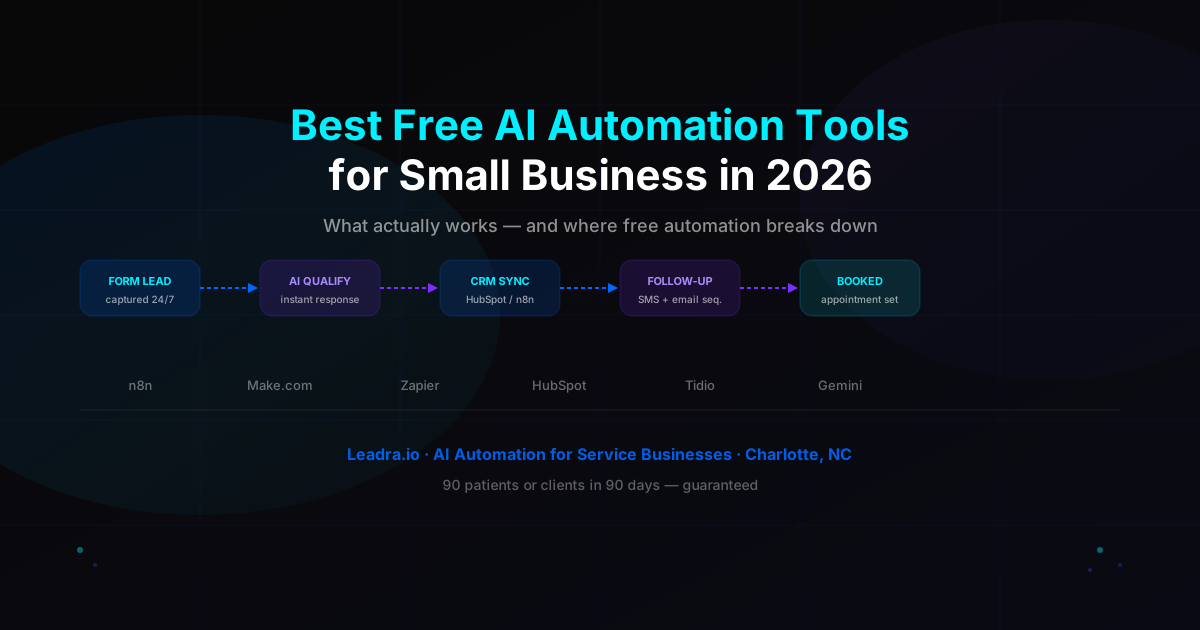
The six tools below are the best free AI automation tools for small businesses in 2026. Each entry covers exactly what it automates, what it costs to run, and where it runs out of road.
The 6 Best Free AI Automation Tools for Small Business in 2026
1. n8n Community Edition
Free (self-hosted)What it automates: Everything. n8n is open-source workflow automation with 400+ app integrations and native AI nodes — GPT-4o, Claude, Gemini. You can build a complete pipeline: new form lead → CRM contact → AI-drafted follow-up email → Slack notification → scheduled callback reminder. All free.
The catch: Self-hosting means you need a Linux VPS (DigitalOcean, Hetzner) or Docker setup. A developer can stand it up in an afternoon. A non-technical business owner cannot. If you do not have a technical co-founder or a developer on retainer, factor in a $300-500 setup cost.
Best for: Businesses with a technical resource and the need for complex, custom automation workflows. Free limit: unlimited executions.
2. Make.com Free Plan
1,000 ops/monthWhat it automates: Multi-step workflows between apps with a drag-and-drop interface — no code required. Connect your website form to HubSpot, send a Gmail welcome message, and log the lead in a Google Sheet in a single scenario. Make runs scenarios in real time (no delays) and handles conditional logic.
The catch: 1,000 operations per month. One lead going through a three-step workflow uses three operations. At 100 leads/month with a three-step scenario, you hit the cap. Active pipelines exhaust this quickly.
Best for: Businesses under 50 leads/month testing automation before committing to a paid plan. Free limit: 1,000 ops/month, 2 active scenarios.
3. Zapier Free Plan
100 tasks/monthWhat it automates: Single-step connections between 5,000+ apps. When a form is submitted, create a CRM contact. When a new customer pays, send a Slack alert. Zapier is the simplest tool on this list and the easiest to set up without any technical knowledge.
The catch: The free plan caps at 100 tasks/month, allows only single-step zaps (no multi-step sequences), and runs checks every 15 minutes — not in real time. For lead response, a 15-minute delay often means a lost customer.
Best for: Simple one-to-one notifications and data syncs with very low volume. Free limit: 5 zaps, 100 tasks/month, 15-minute trigger delay.
4. HubSpot Free CRM + AI
Free forever tierWhat it automates: Contact tracking, deal pipelines, meeting scheduling, and AI-drafted emails. HubSpot's free CRM handles unlimited contacts and includes AI writing assistance in the email composer. The scheduling link (like Calendly) lets leads book directly into your calendar without back-and-forth messages.
The catch: Automated follow-up sequences — sending a series of emails or texts automatically based on lead behavior — require the Starter plan at $15/month. The free CRM tracks contacts but does not send automated communications on its own.
Best for: Businesses building a contact database and pipeline before graduating to automated sequences. Free limit: unlimited contacts, no automated sequences.
5. Tidio Free AI Chatbot
50 conversations/monthWhat it automates: Live chat and FAQ responses on your website. Tidio's free chatbot collects visitor information, answers common questions, and triggers basic follow-up messages. Setup takes about 30 minutes — no developer needed.
The catch: 50 AI-handled conversations per month. A dental office or HVAC company with moderate web traffic can exhaust this in the first week. At the free tier, the AI is rule-based — it cannot learn your services, handle complex objections, or connect to your booking system.
Best for: Testing whether a chatbot captures meaningful leads on your site before committing to a paid plan. Free limit: 50 conversations/month, no custom AI training.
6. Google Gemini in Workspace
Free with Google accountWhat it automates: AI drafting inside Gmail, Docs, and Sheets. Gemini suggests email replies, summarizes long threads, writes proposals from bullet points, and generates formulas in Sheets. If your business runs on Google Workspace, this saves one to two hours per week with zero setup.
The catch: Gemini assists — it does not act. It drafts the email; you send it. It suggests a reply; you click. It does not connect to your CRM, does not trigger follow-ups, and does not run while you sleep. This is AI assistance, not automation.
Best for: Reducing time on individual email and document tasks. Free limit: basic access included; advanced Gemini features require Google One AI plan at $20/month.
Free AI Automation Tools: Side-by-Side Comparison
| Tool | Free Limit | Best Use | Biggest Gap |
|---|---|---|---|
| n8n Community | Unlimited (self-hosted) | Complex multi-step workflows | Requires technical setup |
| Make.com | 1,000 ops/month | Multi-step app automations | Low volume only |
| Zapier | 100 tasks/month | Simple app connections | 15-min delay, single-step |
| HubSpot Free | Unlimited contacts | CRM + pipeline tracking | No automated sequences |
| Tidio | 50 conversations/month | Website lead chatbot | Rule-based, no learning |
| Google Gemini | Basic access free | Email + doc drafting | Assists only, does not act |
What Free AI Automation Cannot Do for Your Business
Free tools can connect apps. They can send a notification, log a contact, and draft an email. What they cannot do is run a complete customer acquisition pipeline — and that is where the money is.
Capture voice leads after hours
When someone calls your plumbing business at 9 PM and gets voicemail, they call your competitor next. No free automation tool replaces a live receptionist or an AI voice employee that qualifies, answers, and books the caller in real time.
Run multi-channel follow-up sequences
A real nurture sequence — SMS on day 1, email on day 3, personalized follow-up on day 7 — requires paid automation. Free tools do one-touch notifications. They do not build relationships at scale.
Learn and improve from your data
Free chatbots follow rules. Paid AI systems analyze which messages convert, which lead sources produce booked appointments, and adjust the workflow automatically. Free tools run the same script forever.
Give you real revenue attribution
You cannot see which automation produced which customer without a paid analytics layer. Free tools tell you what ran. They do not tell you what it was worth or what to do more of.
Real Example: Charlotte Dental Clinic Hits the Free Automation Ceiling
A dental practice in Charlotte ran free AI automation for seven months. They used Make.com to push web form submissions into HubSpot, Tidio for FAQ responses on their site, and Zapier to send a single welcome email after each new contact was created.
The free stack captured 61% of their web leads. The other 39% — calls that came in after office hours, chat sessions that exceeded the 50-conversation monthly limit, and leads who did not convert on the first touch — went unworked. No follow-up, no callback, no booking.
After switching to Leadra.io's AI system — which includes an AI voice employee for after-hours calls, a multi-touch SMS and email follow-up sequence, and intelligent scheduling — that 39% became captured and converted. Fourteen additional patients per month from the same traffic and the same ad budget.
The system paid for itself in month one. The free tools had been costing them $8,400/month in missed revenue they could not see.
4 Signs You Have Outgrown Free AI Automation Tools
- 1
After-hours calls go to voicemail
If calls come in after 5 PM and land on voicemail with no AI response, you are losing customers every night. According to industry data, 65% of callers who reach voicemail do not leave a message — they call a competitor. No free tool fixes this without an AI voice employee.
- 2
You are manually following up with leads
Every follow-up text, email, or call you make by hand is automation you have not built yet — or cannot build with free tools. If you are spending more than one hour per week chasing leads, your automation stack is not doing its job.
- 3
You cannot answer "where did this customer come from?"
If you do not know which channel, campaign, or automation sequence produced each booking, you are running blind. You cannot scale what you cannot measure. Free tools give you activity logs — not business intelligence.
- 4
Your lead-to-booked rate is under 50%
Industry average lead-to-booked rate for service businesses without AI follow-up is 30-40%. AI-powered follow-up systems push this to 65-80%. If you are at or below the industry average, your free AI automation tools are letting paid leads go cold.
Frequently Asked Questions
Can I build a full AI automation system using only free tools?+
You can build a basic automation layer — lead capture to CRM sync, simple notifications, and basic chatbot responses. But a full system that handles after-hours calls, multi-touch follow-up sequences, intelligent scheduling, and revenue attribution requires paid infrastructure. Most businesses spend 3-6 months on free tools, hit a specific bottleneck (usually after-hours leads or manual follow-up time), then upgrade.
Is n8n really free for small businesses in 2026?+
n8n Community Edition is free if you self-host it on a VPS or local server. The software costs $0, but you need technical knowledge to set it up — or a developer to do it for you. For a non-technical business owner, factor in a one-time setup cost of $200-500. n8n's cloud-hosted plan starts at $20/month if you want a managed version without the setup work.
What is the difference between AI tools and AI automation for small business?+
AI tools like ChatGPT, Gemini, or Claude help you complete tasks faster — they assist your work but require you to act on the output. AI automation runs tasks without you — capturing leads, sending follow-up messages, booking appointments — while you are offline. Both add value, but automation produces business outcomes directly. AI tools produce outputs that still need a human to follow through.
What are the signs that free AI automation tools are no longer enough?+
Four clear signals: after-hours calls go to voicemail with no AI response; you or your team are manually following up with leads; you cannot tell which automation produced which revenue; your lead-to-booked rate is under 50%. Industry average without AI-powered follow-up is 30-40%. AI-driven systems push this to 65-80%. If any of these apply, free tools are leaving revenue on the table.
Ready to Move Past the Free Automation Ceiling?
Most small businesses outgrow free AI automation tools within 60-90 days of using them seriously. When you hit that ceiling — when after-hours calls go unanswered, when follow-up falls through, when you cannot see what is driving revenue — the fix is not adding more free tools. It is upgrading the system.
Leadra.io builds and manages AI automation systems for service businesses that need real results. AI voice employee, multi-touch follow-up, intelligent scheduling, and full attribution — all integrated in one pipeline. Guarantee: 90 new patients or clients in 90 days, or you do not pay.