The most valuable patient acquisition opportunity in most dental practices isn't Google Ads. It's not social media. It's sitting inside their practice management software right now — a list of patients who came in once, twice, five times, and then stopped.
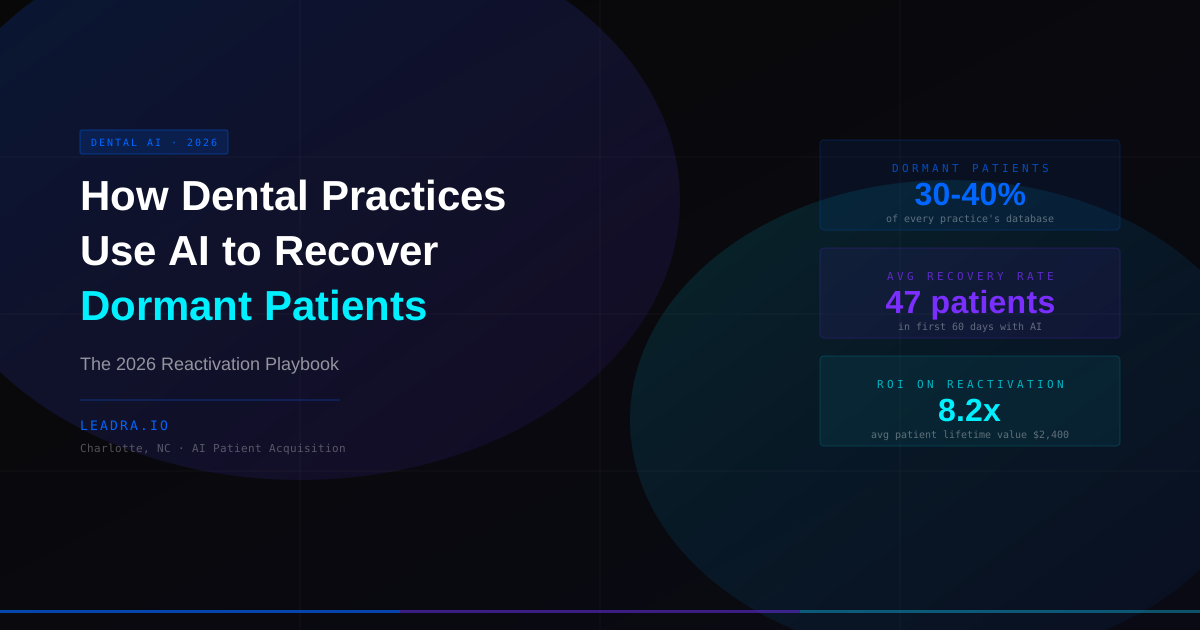
Industry data from the American Dental Association shows that 30-40% of the average practice's patient database is dormant — defined as no appointment in 18 months or longer. For a practice with 1,200 active records, that's 360-480 patients who already trust the office, have already overcome the barrier of a first visit, and have a treatment history that tells you exactly what they need next.
At an average patient lifetime value of $2,400, a dormant list of 400 patients represents $960,000 in unrealized revenue. The reason most of it stays unrealized is simple: manual recall doesn't work at scale, and most practices stop trying after one unanswered postcard.
This guide covers how dental practices use AI to recover dormant patients — the specific system, the exact sequence, and what results look like when it's deployed correctly.
Why Traditional Recall Fails the Dormant Patient Problem
Most dental practices handle dormant patient recall the same way they handled it in 2005 — a postcard at 18 months, maybe a single email blast, and then the patient gets dropped from active recall. The approach hasn't changed. The results haven't either: 3-7% response rates, most of the list permanently abandoned.
Three specific failures make traditional recall ineffective at scale:
Single-touch outreach
A patient who hasn't been in 20 months isn't going to book from one postcard. Research on patient recall consistently shows that reactivation requires 4-7 contact attempts before a dormant patient re-engages. Most practices stop at one or two because the manual effort per patient is too high to justify continuing.
Generic messaging
A patient with $3,200 in pending crown work needs a different message than a healthy patient who just missed their 6-month cleaning. Traditional batch recall sends the same "we miss you" message to both — and converts neither efficiently. Personalization at scale requires automation that most staff-driven recall systems can't deliver.
No response handling after hours
When a dormant patient finally responds to a recall message at 8 PM — often the moment they remember they need to make the appointment — there's no one at the front desk to take the call or reply to the text. The moment passes. They forget again. Traditional recall generates interest it can't capture.
The AI Dormant Patient Recovery System: 5 Components
How dental practices use AI to recover dormant patients involves a connected system — not a single tool or a single email campaign. Here are the five components that make the difference between a 5% recall rate and a 22-28% reactivation rate.
01. AI-Powered Patient Segmentation
Not every dormant patient should get the same message or the same urgency. Before launching any outreach, an AI segmentation layer reads your PMS data and groups dormant patients by: last visit date (18-24 months vs. 3+ years lapsed), pending treatment value (cleaning vs. crown vs. implant workup), previous visit frequency (loyal long-term patient vs. one-time visit), and insurance status (active plan expiring soon vs. no coverage on file).
This segmentation drives the entire downstream sequence. A patient with $4,800 in pending implant work and an active PPO plan expiring December 31 is a different outreach priority than a patient who came in once for an emergency extraction and has no pending treatment. The AI handles this triage at scale — across 500 dormant records — in minutes.
02. Personalized Multi-Touch Reactivation Sequences
Each patient segment gets a tailored sequence of 5-7 contacts over 21 days — SMS, email, and optionally a personalized voicemail drop. The messaging is built around the specific reason that patient should come back: insurance benefits about to expire, pending treatment they were quoted, or simply a friendly check-in from "Dr. [Name]'s team."
The sequence spacing is optimized by response data — day 1 (text), day 3 (email with appointment link), day 7 (follow-up text referencing the first), day 12 (different angle — benefits/urgency), day 17 (final reach-out). Each touchpoint stops automatically the moment a patient books, replies, or opts out. No over-communication, no spam complaints.
03. AI Voice Employee for High-Value Outbound Calls
For dormant patients with $2,000+ in pending treatment value, a personal phone call converts at 3-4x the rate of text and email alone. An AI voice employee places these calls, introduces itself as calling from Dr. [Name]'s office, references the specific treatment the patient was quoted, checks if they have questions, and offers to schedule directly on the call.
The AI handles the full conversation naturally — including objections like "I need to check my schedule" (triggers a follow-up text with the booking link) and "What will this cost?" (gives the range from the treatment plan). Any complex question escalates seamlessly to the front desk. This gives high-value dormant patients the personal outreach their treatment value warrants — without pulling a team member off the phones during peak hours.
04. Timing Optimization by Patient Type
Dormant patient reactivation campaigns perform very differently depending on when they launch. Parents bring children in during late July and early August before school starts — that's the single best window for pediatric patient reactivation. Insurance benefit-expiry messaging peaks in November, when patients realize December 31 is approaching and they haven't used their annual maximum. Post-holiday January is strong for cosmetic and restorative, when patients are in a goal-setting mindset.
An AI reactivation system schedules campaign launches against these seasonal windows — so a practice running year-round reactivation has their messaging timed to patient psychology, not just a rolling 18-month calendar reminder.
05. 24/7 Response Handling and Direct Booking
This is where AI reactivation beats every manual approach: responses come in at all hours. A patient who receives a reactivation text at noon might not look at it until 9 PM. When they reply — "yes, I'd like to come in" or "can I book online?" — the AI handles that response instantly, any hour, and moves them through to a confirmed appointment.
Integration with your PMS scheduling software means a dormant patient can go from receiving a text to confirming an appointment without any staff involvement. The practice management system receives the booking automatically. No manual entry, no next-morning follow-up backlog.
Traditional Recall vs. AI Reactivation: By the Numbers
The operational difference between manual recall and an AI-driven dormant patient recovery system translates directly to revenue. Here's what changes:
| Metric | Traditional Recall | AI Reactivation |
|---|---|---|
| Avg touchpoints per dormant patient | 1-2 | 5-7 |
| Response rate on dormant list | 3-7% | 18-28% |
| Staff time per 100 patients outreached | 8-12 hours | 0 hours |
| After-hours response handling | None | Instant, 24/7 |
| Personalization by patient history | None | Full (treatment + LTV + timing) |
| Avg patients reactivated / 500 dormant | 15-35 | 90-140 |
| Revenue recovered / 500 dormant patients | $36k-$84k | $216k-$336k |
Case Study: Charlotte NC Practice Recovers 47 Dormant Patients in 60 Days
Client Story
A family and cosmetic dentistry practice in South Charlotte had 1,140 patient records in their Dentrix system. When Leadra.io ran an initial database audit, 387 of those records qualified as dormant — no appointment in 18+ months, but valid contact information. The practice had sent one postcard recall to this group 14 months prior. Six patients responded. They hadn't touched the dormant list since.
The AI segmentation layer identified 89 patients with pending treatment value of $1,800 or more, 134 patients whose dental insurance benefits were expiring before year-end, and 164 patients with no pending treatment but a history of consistent annual care who had simply lapsed. Each segment got a different sequence, a different primary message, and different timing.
The 89 high-value pending treatment patients received AI voice calls on day 3 of the sequence, referencing their specific quoted treatment. The insurance-expiry group got urgency-driven messaging starting in early October. The lapsed-loyal group received a warm, personal-tone sequence with a soft incentive for returning.
After 60 days: 47 dormant patients had booked and attended at least one appointment. Total production from those 47 patients in the 60-day window: $112,800 — an 8.2x return on the cost of the reactivation campaign. The 387-patient dormant list went from a forgotten database problem to the practice's highest-ROI revenue channel in Q4.
Dormant list size
387
387 contacted
Patients reactivated
6 (postcard)
47
Revenue recovered
$14,400
$112,800
Campaign ROI
1.8x
8.2x
60-day results, South Charlotte NC general and cosmetic dental practice. Campaign cost: $1,400/month. Production figures from Dentrix reporting.
The key lesson from this case: the dormant list wasn't the problem. The list had always been there. What changed was the system that contacted those patients — with the right message, at the right frequency, at any hour they chose to respond. The practice didn't add a single new lead source. They recovered revenue they had already earned and forgotten.
3-Step Audit: How to Assess Your Dormant Patient Opportunity
Before launching any AI reactivation campaign, run this three-step audit inside your PMS. It takes under an hour and tells you exactly what your dormant list is worth.
Pull all patients with last appointment date 18+ months ago
In Dentrix: Patient module → Recall → filter by last visit date before [18 months ago]. In Eaglesoft: Reports → Patient Recall → set date range. In OpenDental: Reports → Patient List → filter by last visit. Export the count and the list. This is your total dormant population.
Flag patients with valid phone numbers and pending treatment
Cross-reference your dormant list with the pending treatment ledger. Any dormant patient with a treatment plan of $500+ is a priority reactivation target. Also note which patients have active insurance — these are your fastest-converting contacts because they have a financial reason to act quickly.
Calculate your dormant list revenue potential
Multiply your dormant patient count by your average production per visit (typically $350-$600 for a general practice). Then multiply by a conservative 15% reactivation rate to get your realistic 90-day recovery estimate. Most practices are surprised — a dormant list of 300 patients at $450 average visit value, at 15% reactivation, is 45 patients x $450 = $20,250. With AI reactivation at 22-28%, it's $29,700-$37,800 from a list that was completely idle.
Once you know your numbers, learn how AI patient acquisition systems connect dormant reactivation to new patient growth — because the two systems reinforce each other. Dormant patients who return often refer, review, and re-engage with treatment plans that fund new patient acquisition at lower cost.
Frequently Asked Questions
How do dental practices use AI to recover dormant patients?
Dental practices use AI to recover dormant patients through a five-step system: AI-powered segmentation to identify patients by last visit date, pending treatment, and lifetime value; personalized SMS and email sequences with 5-7 touchpoints per patient; AI voice employee calls to high-value dormant contacts; timing optimization around school year, open enrollment, and seasonal health cycles; and automated two-way response handling that moves interested patients directly to booking without staff involvement. Practices using this system recover 25-50 dormant patients in the first 60 days.
What counts as a dormant dental patient?
A dormant dental patient is typically defined as any patient who has not had an appointment in 18 months or longer and has not scheduled future care. Some practices use 12 months as their threshold. The dormant patient problem is severe — industry data shows 30-40% of the average dental practice's patient database meets this definition. That represents $200,000-$800,000 in unrealized revenue sitting in a practice's PMS, waiting to be reactivated.
Is AI reactivation better than a traditional patient recall system?
Yes — significantly. Traditional recall systems send a single postcard or batch email to all overdue patients and see 3-7% response rates. AI reactivation delivers 5-7 personalized touchpoints per patient, personalizes the message based on the patient's specific history and pending treatment, and handles responses automatically at any hour. The result is 18-28% reactivation rates on dormant lists — 4-5x higher than manual recall. The difference compounds: 40 dormant patients reactivated at $2,400 average LTV is $96,000 in recovered revenue.
How long does it take to see results from an AI dormant patient campaign?
Most dental practices see the first reactivated appointments within 7-10 days of launching an AI dormant patient campaign. The first 30 days typically produce the highest response rate, as the most recently lapsed patients (18-24 months) are easiest to reactivate. By day 60, a practice with 500 dormant contacts should have recovered 40-90 patients depending on how current the contact information is in the PMS.
The Revenue Is Already in Your Database
The most underused asset in most dental practices isn't their location, their staff, or their clinical skill. It's the patient list they already built — the 30-40% who came in, trusted the office, and stopped scheduling for reasons that have nothing to do with dissatisfaction. Life gets busy. Insurance changed. Nobody followed up enough times to remind them.
AI changes the follow-up math. Five to seven personalized touchpoints per patient, at any hour, responding to replies in real time — that's not something a front desk team can deliver across 400 dormant contacts without burning out. An AI reactivation system does it automatically, every day, and stops the moment the patient books.
The Charlotte practice in this guide recovered $112,800 from patients they had given up on. That same dormant list was there for years before AI made it actionable. Read more about how an AI voice employee handles the inbound and outbound calls that convert dormant patients — it's the piece that converts interest into booked appointments at any hour.
Dormant Patient Audit — Free
Find Out What Your Dormant Patient List Is Worth
We run a free database audit on your PMS export — identifying dormant patient count, pending treatment value, and projected 90-day revenue recovery. No commitment required.
Leadra.io
AI marketing agency — Charlotte, NC · Published May 29, 2026