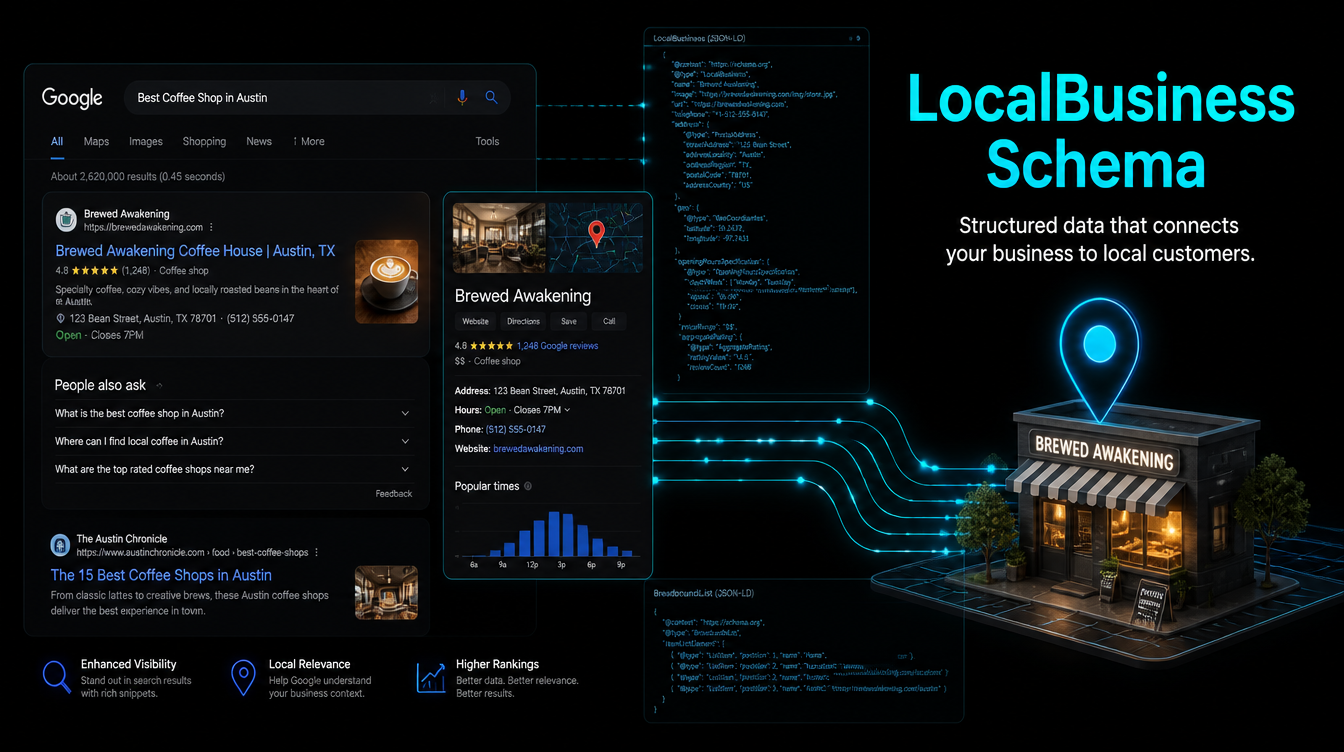
If your service business shows up in Google search but not in the local pack, not in the Knowledge Panel, and not in Google AI Overviews — there's a good chance you're missing one thing: LocalBusiness schema.
LocalBusiness schema is structured data that tells Google exactly what your business is, where it operates, what hours you keep, and what services you offer. Without it, Google infers this information — and inference is imprecise. With it, you hand Google a complete, machine-readable profile of your business that it can use to populate rich results, feed AI Overview answers, and rank you in the local pack.
This guide walks through the full LocalBusiness schema setup for local SEO: which fields to include, the exact JSON-LD code to use, how to validate it, and what to expect from Google once it's live.
Why LocalBusiness Schema Is the Foundation of Local SEO in 2026
Google processes over 8.5 billion searches per day. A growing share of those — especially local intent queries like “HVAC contractor near me” or “best dentist in Charlotte” — are now answered by AI Overview snippets, not just a list of blue links. According to BrightLocal's 2026 Local SEO Survey, businesses with complete structured data are 2.7x more likely to appear in AI-generated local answers than those without it.
The reason is simple: AI systems need structured, unambiguous data to generate trustworthy answers. When your page includes LocalBusiness schema markup, you're giving Google a direct feed of verified business information. When you don't, Google scrapes and guesses — and it doesn't always guess right.
Beyond AI citations, LocalBusiness schema directly affects:
- Google Knowledge Panel — the business info box that appears on the right side of desktop search results
- Google Maps local pack — the top 3 map results that capture 44% of all clicks on local searches (Moz, 2025)
- Rich results in SERPs — star ratings, hours, and business type shown directly in organic listings
- Voice search answers — Google Assistant and Siri pull business hours and contact info directly from LocalBusiness schema
At Leadra.io, schema markup is the first technical SEO layer we implement for every client — before content, before link building. It's the fastest, most reliable signal you can give Google about who you are and where you operate.
Pick the Right Schema Type — Not Just “LocalBusiness”
LocalBusiness is the parent type in Schema.org's taxonomy — but you should almost never use the generic type. Google gives significantly stronger local ranking signals to specific subtypes. Here are the most relevant ones for service businesses:
| Business Type | Schema.org Type |
|---|---|
| Dental practice | DentalClinic |
| HVAC contractor | HVACBusiness |
| Plumber | Plumber |
| Law firm | LegalService or Attorney |
| Roofing contractor | RoofingContractor |
| Medical practice | MedicalBusiness or Physician |
| Accounting firm | AccountingService |
| Hair salon / spa | HealthAndBeautyBusiness |
| Restaurant / café | Restaurant or CafeOrCoffeeShop |
| Gym / fitness studio | SportsActivityLocation |
| Electrician | Electrician |
| Cleaning service | HomeAndConstructionBusiness |
Every subtype inherits all LocalBusiness properties — you lose nothing by going specific. If your industry doesn't appear in the Schema.org taxonomy, use LocalBusiness as a fallback. Check the full list at schema.org/LocalBusiness.
How to Set Up LocalBusiness Schema — Step by Step
This is the exact process we use when implementing LocalBusiness schema for local SEO. It takes under an hour for a single-location business.
Step 1: Choose Your @type and Gather Your Business Data
Start with the specific Schema.org type from the table above. Then collect: your exact business name (matching Google Business Profile exactly), full street address, phone number with country code, website URL, current operating hours, a high-resolution logo URL, and your service area. Consistency between your schema, your GBP, and your website NAP data is critical — any mismatch signals distrust to Google.
Step 2: Write the JSON-LD Block
JSON-LD is the format Google recommends over Microdata or RDFa. It goes inside a <script type="application/ld+json"> tag in your page's <head>. Here's a complete example for a Charlotte dental practice:
{
  "@context": "https://schema.org",
  "@type": "DentalClinic",
  "name": "Charlotte Family Dentistry",
  "url": "https://charlottefamilydentistry.com",
  "telephone": "+17045550123",
  "email": "hello@charlottefamilydentistry.com",
  "image": "https://charlottefamilydentistry.com/images/logo.jpg",
  "priceRange": "$$",
  "address": {
    "@type": "PostalAddress",
    "streetAddress": "1234 South Blvd",
    "addressLocality": "Charlotte",
    "addressRegion": "NC",
    "postalCode": "28203",
    "addressCountry": "US"
  },
  "geo": {
    "@type": "GeoCoordinates",
    "latitude": 35.2143,
    "longitude": -80.8562
  },
  "openingHoursSpecification": [
    {
      "@type": "OpeningHoursSpecification",
      "dayOfWeek": ["Monday","Tuesday","Wednesday","Thursday"],
      "opens": "08:00",
      "closes": "17:00"
    },
    {
      "@type": "OpeningHoursSpecification",
      "dayOfWeek": ["Friday"],
      "opens": "08:00",
      "closes": "14:00"
    }
  ],
  "areaServed": {
    "@type": "City",
    "name": "Charlotte"
  },
  "sameAs": [
    "https://www.google.com/maps?cid=YOUR_GBP_CID",
    "https://www.yelp.com/biz/charlotte-family-dentistry",
    "https://www.facebook.com/charlottefamilydentistry"
  ]
}
Step 3: Add “sameAs” Links to All Your Profiles
The sameAs property is one of the most underused fields in LocalBusiness schema — and one of the most powerful for local SEO. It tells Google that your website, your Google Business Profile, your Yelp page, and your Facebook page all represent the same entity. This consolidates your entity authority. Include every verified profile: Google Maps CID, Yelp, Facebook, LinkedIn, BBB, and any industry-specific directories. The more consistent signals Google receives, the more confidence it has in your business data.
Step 4: Add AggregateRating If You Have Reviews
If your business has reviews on Google or other platforms, add an aggregateRating block inside your LocalBusiness schema. This enables star rating rich results in SERPs — typically increasing click-through rates by 15-30%. You'll need to keep the count and rating value current. Here's the field to nest inside your main schema:
"aggregateRating": {
  "@type": "AggregateRating",
  "ratingValue": "4.9",
  "reviewCount": "127",
  "bestRating": "5",
  "worstRating": "1"
}
Step 5: Validate with Google's Rich Results Test
Before deploying, paste your JSON-LD into Google's Rich Results Test (search.google.com/test/rich-results). It will flag any missing required fields, typos in property names, and eligibility for rich result features. Fix all errors before going live — invalid schema is worse than no schema because it can cause Google to distrust your structured data entirely.
Step 6: Deploy and Submit Your Sitemap
Add the validated JSON-LD block to the <head> of your homepage and any key service pages. For WordPress, plugins like Yoast or RankMath can manage this automatically. For custom or static sites like Next.js, add the <script> tag directly to your page component. After deploying, go to Google Search Console, submit your sitemap, and use the URL Inspection tool to request indexing on your homepage. This typically triggers a recrawl within 24-72 hours.
Multi-Location Businesses: One Schema Block Per Location
If you operate multiple locations, each location needs its own LocalBusiness schema block on its own dedicated page. Do not try to describe multiple addresses inside a single schema block — Google treats each schema block as representing one physical entity.
For a dental group with three Charlotte offices, you'd create:
/locations/south-end— schema for the South End office/locations/ballantyne— schema for the Ballantyne office/locations/matthews— schema for the Matthews office
Each page gets its own schema with the specific address, phone number, hours, and geo coordinates for that location. Then use the parentOrganization property inside each location's schema to link it back to the main organization entity. This structure signals to Google that multiple locations belong to one trusted brand.
LocalBusiness Schema for Charlotte, NC Service Businesses
Charlotte is one of the fastest-growing metros in the Southeast — with over 900,000 residents and a small business ecosystem that's expanded by 14% since 2023. That growth means more competition for local search visibility in every service category.
For Charlotte-area service businesses, there are a few specific schema opportunities:
- Use Charlotte neighborhood names in areaServed — include sub-areas like Ballantyne, SouthPark, Plaza Midwood, Uptown, Huntersville, and Matthews to capture hyper-local queries
- Set geo coordinates to your exact office — not the center of Charlotte; Google uses geo data for the local pack radius calculation
- Include your GBP CID in sameAs — your Google Business Profile CID URL links your structured data to your verified GBP listing, which is the single most trusted local signal Google uses
- Add ServiceArea schema for service-based businesses — if you serve clients at their homes or businesses (HVAC, roofing, cleaning), use
serviceAreainstead of — or in addition to —areaServed
Leadra.io has helped Charlotte-based contractors, dental practices, and law firms implement full LocalBusiness schema as part of our AI SEO and marketing systems. The typical result: local pack visibility within 30 days of implementation.
5 LocalBusiness Schema Mistakes That Kill Your Local SEO
The schema is on your site but Google isn't responding? One of these is probably the reason.
1. NAP mismatch between schema and Google Business Profile
Your schema says “Ste. 200” but your GBP says “Suite 200.” Your schema phone is (704) 555-0123 but GBP shows 704.555.0123. These mismatches signal inconsistency. Every field must match exactly — character for character.
2. Using generic “LocalBusiness” instead of a specific subtype
The generic type gets treated as a weak signal. Use the most specific subtype available for your industry. This alone can move you into local pack eligibility for category-specific queries.
3. Only adding schema to the homepage
LocalBusiness schema on your homepage tells Google about your business entity. But your service pages also need relevant schema — Service and FAQPage schema on interior pages drives AI Overview citations for specific keyword queries.
4. Static hours that never get updated
If your schema says you're open Friday 8am-5pm but your GBP shows 8am-2pm (because you changed it last summer), Google detects the conflict and reduces trust in both sources. Update your schema every time your hours change.
5. Missing geo coordinates
The geofield is technically optional — but it's critical for local pack rankings. Google uses latitude and longitude to calculate proximity to a searcher's location. Without it, your local pack eligibility is weaker, especially for “near me” queries.
Your Action Plan
Choose your specific Schema.org @type — use the table above; avoid the generic LocalBusiness when a subtype exists
Write the JSON-LD block — include name, address, telephone, geo, openingHoursSpecification, image, sameAs, and priceRange
Validate with Google Rich Results Test — fix all errors before deploying
Deploy to homepage and key service pages — add FAQPage schema to any page targeting high-volume local queries
Submit sitemap in Google Search Console — request indexing on your homepage to trigger a fast recrawl
Monitor Google Search Console for schema errors — check the Enhancements tab weekly for the first 30 days
Frequently Asked Questions
What is LocalBusiness schema and why does it matter for local SEO?
LocalBusiness schema is JSON-LD structured data that tells Google exactly what your business is, where it's located, what hours you operate, and what services you provide. In 2026, it matters because Google uses it to populate Knowledge Panels, the local pack, and AI Overview answers. Businesses with complete LocalBusiness schema are 2.7x more likely to appear in AI-generated local search answers.
What fields are required in LocalBusiness schema?
Google requires: @type, name, address (with streetAddress, addressLocality, addressRegion, postalCode, addressCountry), and telephone. Strongly recommended fields for rich results: url, openingHours, geo, image, and priceRange. The sameAs field — linking to your GBP, Yelp, and Facebook profiles — is optional but high-impact for entity authority.
How long does it take for LocalBusiness schema to show in Google?
After implementation and validation, Google typically recrawls your homepage within 3-14 days. Knowledge Panel updates can appear within 1-2 weeks. Rich result eligibility in local SERPs stabilizes within 30 days. Submit your updated sitemap in Google Search Console to speed up the crawl.
Should I use LocalBusiness or a more specific type like DentalClinic?
Always use the most specific subtype available. Specific types like DentalClinic, Plumber, or HVACBusiness give stronger local SEO signals than the generic LocalBusiness type. Subtypes inherit all LocalBusiness properties — you lose nothing by being specific. Use LocalBusiness only if no subtype exists for your industry.
Final Thoughts
LocalBusiness schema setup is the highest-leverage technical SEO task a local service business can do in an afternoon. It costs nothing, requires no external approvals, and produces measurable results in the local pack within 30 days when implemented correctly.
The businesses winning in local search right now are not the ones with the most ad spend or the biggest social media following. They're the ones who gave Google a clean, complete, structured picture of who they are — and let Google do the rest.
If you'd rather have this done right without touching code, that's exactly what Leadra.io handles as part of our AI SEO and content system. We implement structured data, build out your content pipeline, and get you ranking — typically within 90 days.
Want Your LocalBusiness Schema Implemented and Validated?
Leadra.io implements complete structured data setups — LocalBusiness, FAQPage, Service, and AggregateRating — as part of our local SEO system for Charlotte and nationwide service businesses.
Written by the Leadra.io Team. Leadra.io is an AI marketing and SEO agency helping service businesses rank on Google and get cited in AI search results. Based in Charlotte, NC — serving clients nationwide.