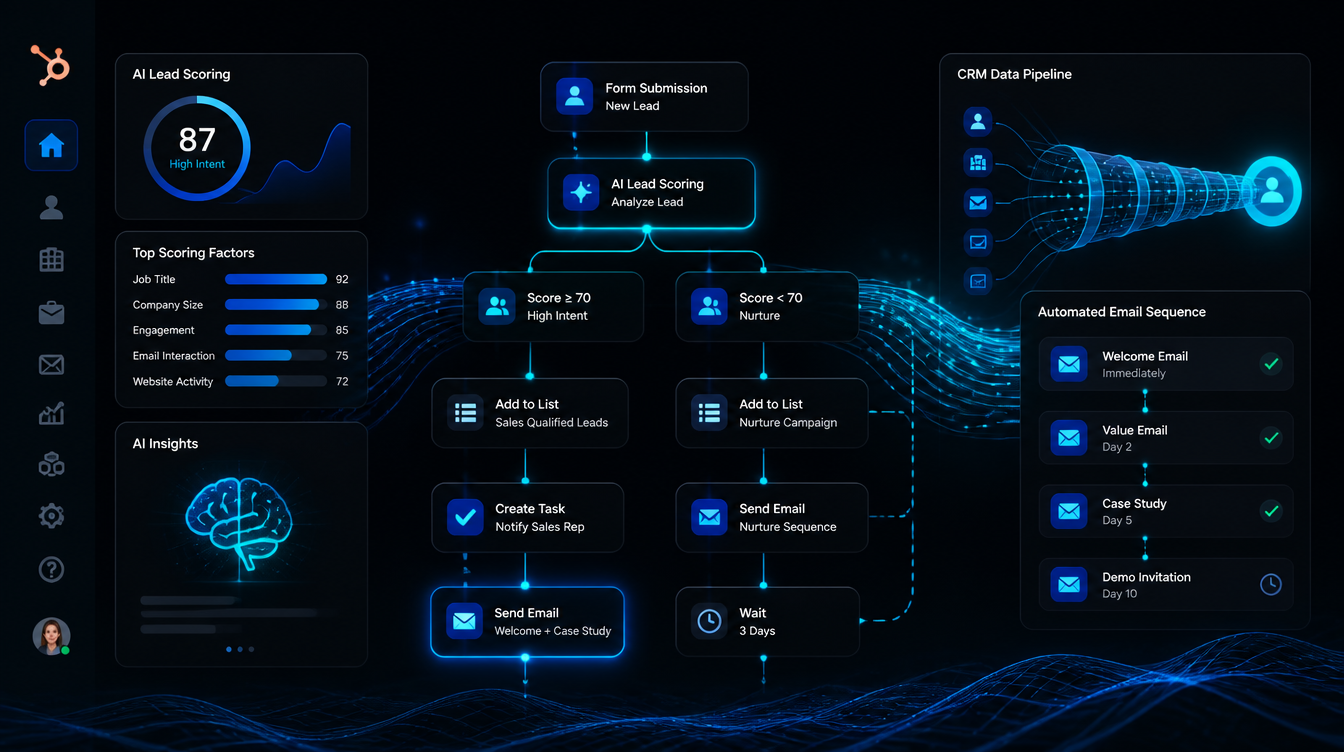
HubSpot has been telling small businesses for years that automation is the answer. Now they've added AI to the pitch. Breeze AI, ChatSpot, predictive lead scoring, smart send times — the feature list is long. So you upgraded. You paid the onboarding fee. You built a few workflows. And somewhere between the second workflow and the third training webinar, you realized: this is not saving time. This is just a different kind of work.
The promise of HubSpot AI automation for small businessesis real — but the gap between what it promises and what it delivers without dedicated in-house expertise is also real. This guide breaks down exactly what HubSpot's AI tools do, what they require to work, where they fall short for owner-operated businesses, and what a small business owner can do instead to get the same outcomes without the setup burden.
If you want a faster path to results, you can book a free strategy session at leadra.io/contact. We'll show you what automated lead response looks like running live in your market before you commit to anything.
What HubSpot AI Automation Actually Includes in 2026
HubSpot launched its "Breeze AI" suite in late 2024 and expanded it through 2025. The suite is marketed as a full AI layer across the CRM, marketing, sales, and service hubs. Here is what the features actually do — and what they require from you:
| AI Feature | What It Does | The Catch |
|---|---|---|
| Breeze AI Content Assistant | Drafts emails, blog posts, landing page copy | You still review, edit, and publish everything |
| Predictive Lead Scoring | Ranks contacts by conversion likelihood | Requires 1,000+ contacts + 90 days of data to train |
| AI Workflow Suggestions | Recommends automation sequences based on contact behavior | Still requires manual configuration and testing |
| ChatSpot | Conversational interface to query CRM data | Query tool only — does not execute actions |
| AI-Powered Chatbot | Website chat with automated responses | Text-only, website only — no SMS, no voice |
| Smart Send Time | Recommends when to send emails per contact | Email only, not SMS or multi-channel |
Notice what is missing from the table: voice. After-hours call capture. SMS automation. Real-time personalized text response to inbound leads. These are the tools that move the needle for local service businesses — dental practices, HVAC companies, law firms, med spas, home services — and HubSpot's native AI suite does not include them without third-party integrations that add cost and complexity.
HubSpot's AI is built for marketers managing large contact databases. It is not built for a business owner who needs a lead that called at 9 PM to get a text back at 9:01 PM.
What It Actually Takes to Set Up HubSpot AI Automation
The HubSpot onboarding documentation estimates 4-6 weeks to go live with a basic automation setup. That assumes someone on your team is spending 10-15 hours per week on configuration. For a small business owner already running operations, that time rarely exists.
The realistic setup path for a service business wanting to use HubSpot AI automation:
Platform selection and purchase
Marketing Hub Professional ($800/mo minimum) + mandatory onboarding fee ($1,500). Decision time: 1-2 weeks.
CRM setup and contact import
Clean your existing contact list, map fields, import data, set up deal pipelines. Realistic time: 10-20 hours.
Form and lead capture configuration
Connect web forms to HubSpot, build landing pages, set up conversion tracking. Requires developer or HubSpot CMS.
Workflow and sequence building
Build enrollment triggers, email sequences, task automation, and branch logic. This is where most small businesses get stuck — 20-40+ hours of configuration.
AI feature training period
Predictive lead scoring requires 90 days of data and 1,000+ contacts before it works. Breeze AI content tools work immediately but require human review and editing.
Ongoing maintenance
Workflows break. Contacts fall out of sequences. Email deliverability needs monitoring. Expect 5-10 hours/month minimum to keep it running.
The Time Reality
A full HubSpot AI automation setup for a service business takes 60-100 hours to build correctly. At a $75/hour opportunity cost for a business owner, that's $4,500-$7,500 in time before you book a single extra client. Most owners underestimate this by a factor of three.
Where HubSpot AI Automation Works Well
To be fair: there are small businesses where HubSpot AI delivers strong ROI. They share specific characteristics that make the platform worth the investment:
You have a dedicated in-house marketer
If one person on your team owns HubSpot full-time — builds workflows, monitors performance, writes content — the platform pays off. The AI tools cut that person's time significantly. Without this person, the tools sit idle.
Your contact database is large and segmented
HubSpot's predictive lead scoring and smart send-time tools are genuinely powerful at 5,000+ contacts. The AI learns from patterns in your data. With a small contact list, it has nothing to train on.
Your sales cycle is email-driven
B2B companies where email nurture is the primary conversion channel get the most from HubSpot AI. The Breeze Content Assistant and sequence suggestions are built for this workflow.
You need advanced CRM pipeline management
If you have a 10-person sales team managing complex deal pipelines with multiple stakeholders, HubSpot's AI-assisted forecasting and deal scoring are valuable tools that competing platforms can't match.
Where HubSpot AI Falls Short for Small Service Businesses
The local service business model — dental practices, HVAC, plumbers, law firms, med spas, cleaning companies — has specific needs that HubSpot's AI features consistently miss:
Speed-to-lead is the revenue variable.MIT research shows that responding to a lead within 5 minutes makes you 100x more likely to reach them than waiting 30 minutes. A 2025 InsideSales study found 78% of customers choose the first vendor to respond. HubSpot can send an automated email when a form is submitted — but email response rates average 15-20%, and most leads in the service industry don't check email within the first hour. They need a text.
HubSpot does not include native SMS without a third-party integration (Salesmsg, TextUs, or similar) adding $50-$200/month and another tool to manage. It does not include after-hours voice AI. It does not include a system that calls a lead back automatically when they click away without booking. These capabilities exist in the AI marketing ecosystem — just not natively in HubSpot.
The second gap is execution bandwidth. HubSpot assumes a team. A Charlotte landscaping company with two office staff can't dedicate 10 hours a week to CRM maintenance. A dental practice manager handling insurance verification, scheduling, and patient care can't be the HubSpot admin. When a small business purchases HubSpot AI automation hoping it will run itself, the reality is almost always disappointing.
These gaps are why AI marketing automation for small businesses has moved toward done-for-you services rather than self-serve platforms.
The Real Cost of HubSpot AI Automation for Small Businesses
The advertised price and the real price are rarely the same. Here is what a small service business actually pays to run HubSpot AI automation effectively:
Compare that to a done-for-you AI marketing service like Leadra.io at $1,200-$3,500/month — which includes full setup, active management, AI SMS lead response within 60 seconds, 10-touch follow-up sequences, Google review automation, SEO content, and a performance dashboard. No onboarding fee. No specialist to hire. No tools to manage.
The cost gap is real. But the bigger issue is what the difference in setup time costs you in missed leads while you are waiting to go live.
Case Study: Charlotte Landscaping Company Switches from HubSpot to Done-for-You AI
Client Story — Charlotte, NC
A Charlotte commercial landscaping company with 12 employees purchased HubSpot Marketing Professional in January 2026. They paid the $1,500 onboarding fee and spent six weeks configuring workflows with a freelance HubSpot consultant at $1,800/month.
Three months later: their email open rates looked good (27% average). But lead-to-booked-estimate rate was stuck at 18%. New job volume had not moved. The consultant explained the AI lead scoring model needed more data. The owner was spending four hours per week reviewing HubSpot reports and approving Breeze AI-drafted emails.
They moved to Leadra.io in April. We deployed AI SMS response to every web and phone lead within 60 seconds, a 12-touch follow-up sequence over 21 days, quarterly seasonal reminder campaigns to dormant contacts, and a monthly SEO blog post targeting Charlotte commercial landscaping keywords. Setup took 68 hours.
Monthly inbound leads
41
41
Lead-to-estimate rate
18%
44%
Estimates booked/mo
7
18
Days to positive ROI
24
11 additional estimates/month at 55% close rate and $4,200 average job value = $25,410 additional monthly revenue. Monthly Leadra.io cost: $2,400. ROI: 10.6x by month 1.
The HubSpot data was organized and useful. The problem was that organized data doesn't follow up with leads at 9 PM on a Saturday. The AI SMS response did — and that single change drove the 18% to 44% lead-to-estimate improvement. Same lead volume. Radically different execution.
HubSpot AI vs. Done-for-You AI: How to Decide
HubSpot AI automation is the right choice if:
You have a full-time in-house marketer with HubSpot experience
Your business runs on email-heavy B2B sales cycles
You have 5,000+ contacts and need advanced segmentation
You need enterprise CRM pipeline management with AI forecasting
You have the budget for platform + specialist + ongoing maintenance
Done-for-you AI is the right choice if:
You need results in 30-60 days, not after a 90-day setup
Your team doesn't have time to learn and manage a CRM platform
You need SMS and voice response — not just email
You want one vendor responsible for results, not a platform + an agency
Your leads are local service inquiries where speed-to-response wins the job
You want a guarantee — not a tool that might work if configured correctly
For most local service businesses — the dentists, contractors, med spas, and professional services firms that make up the majority of small business owners in Charlotte and across the US — the done- for-you path consistently wins on ROI speed. Not because HubSpot is bad software, but because software that isn't fully deployed doesn't produce results. Execution is what moves the needle.
If you want to see how AI marketing automation ROI looks in the first 90 days, we've published client data with full methodology and transparent numbers.
Frequently Asked Questions
Does HubSpot have AI automation features for small businesses?
Yes. HubSpot's Breeze AI suite (released 2024-2025) includes an AI Content Assistant for writing emails and blog posts, predictive lead scoring, AI-powered workflow suggestions, and a ChatSpot conversational interface. These are available on Professional and Enterprise tiers starting at $800/month. The tools assist with tasks but require your team to set up, configure, and manage them. They do not replace execution — they assist someone who is already executing.
Can HubSpot AI respond to leads automatically?
HubSpot can trigger automated email sequences when a lead fills out a form, but it cannot send personalized SMS messages or make voice calls without third-party integrations. Response timing depends on how your workflows are configured and whether those workflows are set up correctly. A properly configured HubSpot sequence can follow up within minutes of a form submission, but setup requires technical knowledge and ongoing maintenance.
How much does HubSpot AI automation cost for a small business?
Accessing HubSpot's AI automation features requires at minimum the Marketing Hub Professional plan at $800/month for 2,000 contacts plus a mandatory $1,500 onboarding fee. Most small businesses also need an agency or specialist to build and manage their workflows, adding $1,500-$3,000/month. Total realistic cost: $2,300-$5,000/month. Compare that to a done-for-you AI automation service like Leadra.io at $1,200-$3,500/month with setup included and results guaranteed.
What is the alternative to HubSpot AI automation for small businesses?
Done-for-you AI marketing services like Leadra.io offer the outcomes HubSpot AI promises — instant lead response, multi-channel follow-up, content production, and analytics — without requiring your team to learn, configure, or maintain software. Leadra.io deploys in 48-72 hours, responds to leads via text within 60 seconds, and guarantees 90 new clients in 90 days. For small business owners without an in-house marketer, this approach consistently delivers faster ROI than self-managed HubSpot.
The Bottom Line on HubSpot AI Automation
HubSpot's AI features are real, and for the right business with the right team, they add meaningful value. But for the owner-operator who bought HubSpot expecting it to automate their marketing without a dedicated person running it, the AI layer doesn't close the execution gap. It requires more execution.
The businesses growing fastest in 2026 are not the ones with the most sophisticated CRM. They are the ones with the fastest lead response and the most consistent follow-up. Those are execution problems, not software problems. And execution is exactly what a done-for-you AI service delivers.
At Leadra.io, we back that with a guarantee: 90 new patients or clients in 90 days, or you don't pay. Call us at +1 (864) 721-8384 or book a free strategy session. We'll walk through your current setup, show you what AI automation looks like running live in your market, and give you projected ROI before you commit to anything.
Free AI Automation Audit
See What Done-for-You AI Delivers for Your Business
30 minutes. We'll review your current lead flow, show you AI response working live, and give you projected ROI from your first 90 days. No pitch deck. No obligation.
Leadra.io
AI marketing agency — Charlotte, NC · Published July 5, 2026