Why Dentrix AI Voice Agent Integration Matters
Dentrix holds over 35,000 dental practices in the US — it is the most widely used practice management system in the country. Every one of those practices has the same problem: the phone is answered by a person who can only handle one call at a time, works set hours, and has to manually enter every booking.
According to Dental Economics, the average dental practice misses 23% of inbound calls during business hours and nearly 100% of calls after 5 PM. Each missed call represents $200 to $800 in lost production when you factor in the lifetime value of a patient who never books.
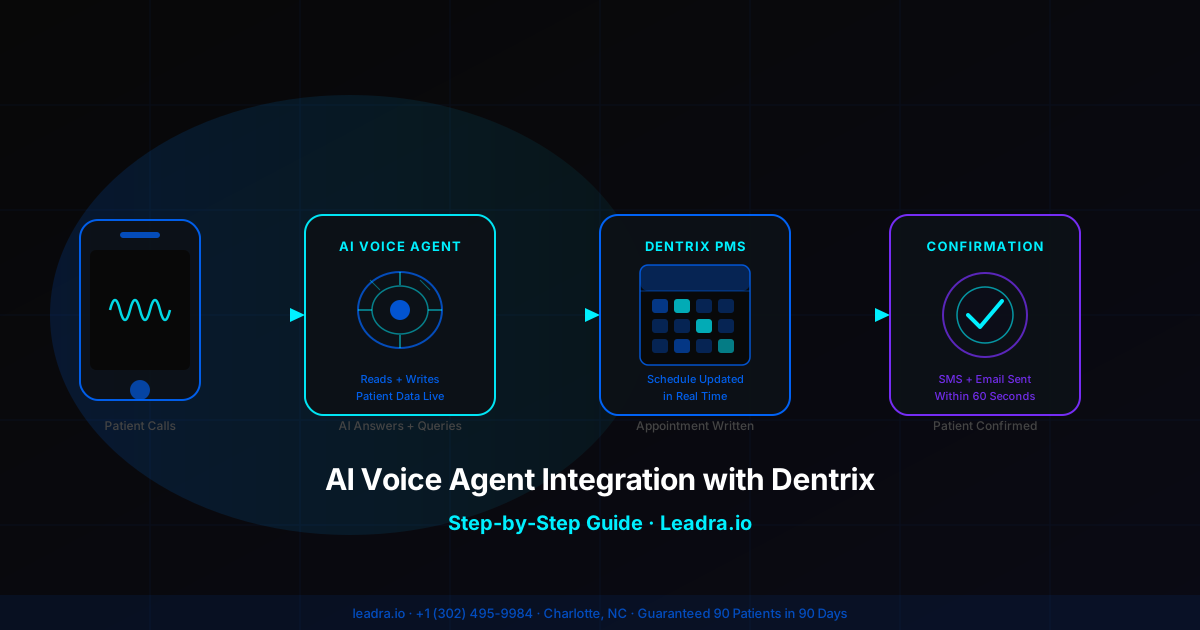
An AI voice agent fixes this at the source. When integrated with Dentrix, it does not just take a message — it pulls live schedule data, offers real open slots, confirms the appointment, and writes the booking directly into Dentrix. The front desk sees a confirmed appointment, not a callback list.
The integration also works outbound: the same AI voice agent can call through your Dentrix recall list, reactivate dormant patients, and fill last-minute cancellation slots — all without staff time. See the full Dentrix automation playbook here.
Before vs. After Dentrix AI Voice Integration
| Scenario | Without AI Voice Agent | With Dentrix AI Integration |
|---|---|---|
| After-hours inbound call | Goes to voicemail, 60-70% don't call back | AI answers, books in Dentrix live, confirms via SMS |
| Lunchtime call volume spike | 2-3 calls go to hold or missed | Unlimited concurrent calls handled simultaneously |
| New patient appointment request | Staff manually checks schedule, calls back next day | AI checks real-time Dentrix slots, confirms on the call |
| Recall / hygiene reminder | Staff manually dials recall list 2-3x per week | AI autodials from Dentrix recall data, books directly |
| Cancellation slot fill | Coordinator calls waitlist manually | AI calls Dentrix waitlist contacts, fills slot in minutes |
| Dormant patient reactivation | Mass email with 8-12% open rate | AI voice call from real patient record data, 40%+ response |
| Data entry per booking | 5-10 min staff time per appointment | 0 min — AI writes directly to Dentrix schedule |
| Call-to-booking conversion rate | 45-55% during office hours only | 65-75% 24/7/365 |
AI Voice Agent Integration with Dentrix: Step by Step
This is the exact sequence Leadra.io uses when deploying an AI voice agent on a Dentrix-based dental practice. The process runs 5 to 7 business days from kickoff to live calls.
Step 1: Enable Dentrix API Access and Pull Credentials
Dentrix provides API access through Henry Schein One's integration framework. To start, your practice needs to either have API credentials already enabled (common in enterprise Dentrix G6+ installations) or submit an API access request through the Dentrix Customer Support portal.
You will need: your Dentrix license key, the primary admin login, and confirmation of which server environment hosts your Dentrix database (local server vs. Dentrix Enterprise cloud).
Once API access is active, Leadra.io receives read/write credentials scoped specifically to: appointment scheduling, patient demographics, provider availability, and treatment plan status. No billing or clinical notes access is required for voice agent functionality.
Step 2: Map Your Provider Schedule and Operatory Logic
Before the AI voice agent can offer appointment slots, it needs to understand your scheduling rules. This step pulls your Dentrix provider configuration and maps it to the AI's booking logic.
The mapping covers: which providers see new patients vs. existing patients, which appointment types (new patient exam, hygiene, emergency, cosmetic consult) map to which operatories, minimum time blocks per appointment type, and any hold blocks the AI should never offer.
This step typically takes 4 to 8 hours of configuration work. Practices with clean, organized Dentrix schedules complete this faster. Practices with heavy custom appointment types or complex multi-provider logic may take the full day.
Step 3: Train the AI Voice Agent on Your Practice
The AI voice agent needs to know your practice before it handles a single call. Training inputs include: practice name and provider names (including pronunciation), accepted insurance carriers (pulled from your Dentrix fee schedule), service menu and prices for uninsured callers, office hours and after-hours protocol, and common patient questions specific to your practice.
Training also includes call flow logic: how to handle a caller who wants an emergency appointment vs. a routine cleaning, how to verify existing patient status by pulling their record from Dentrix, and what to say when a preferred slot is unavailable and the system offers an alternative.
At Leadra.io, this training phase uses recordings from your actual front desk calls (if available) to match the tone and language your patients are already familiar with. Most practices complete training in one business day.
Step 4: Connect the Voice Agent to Your Phone System
The AI voice agent routes through your existing practice phone number. No patient ever dials a different number. The most common integration method is SIP trunk forwarding — your phone provider forwards unanswered calls (after X rings) or all calls to the AI voice agent's SIP endpoint.
Compatible phone systems include: RingCentral, Weave, Talkroute, 8x8, VoIP.ms, and most standard PSTN landline providers. Weave is the most common system in dental practices — Leadra.io has a pre-built Weave forwarding configuration that takes under 30 minutes to activate.
You control when the AI answers. Common configurations: AI answers all calls immediately (maximum coverage), AI answers only when all lines are busy (overflow mode), or AI handles all after-hours calls while staff handles business hours (hybrid mode).
Step 5: Set Up the Dentrix Write-Back and Confirmation Workflow
This is the step that separates a real AI voice integration from a message-taking system. When the AI voice agent confirms a booking, it executes a write-back to Dentrix that: creates the appointment under the correct provider, assigns the right operatory, sets the appointment type, and adds a source note (e.g., "Booked via AI voice agent — inbound call 6/25/2026 9:14 PM").
Immediately after the write-back, the confirmation workflow triggers: an SMS confirmation to the patient's mobile number on file (or the number they called from), an email confirmation if an email address is on file in Dentrix, and a 48-hour pre-appointment reminder sequence starting automatically.
New patients who do not have a Dentrix record yet are handled differently: the AI collects name, date of birth, insurance carrier, and contact info during the call, creates a pending patient record in Dentrix, and flags it for front desk review before the appointment.
Step 6: Configure Outbound Recall and Reactivation Campaigns
Once the inbound call flow is live, the outbound layer activates. The AI voice agent connects to Dentrix's patient database and builds three automated outbound lists: hygiene recall (patients whose last cleaning was 6 months ago), treatment plan follow-up (patients with unscheduled treatment in Dentrix), and dormant reactivation (patients with no appointment in 18+ months).
These lists update from Dentrix data daily. The AI makes outbound calls during a window you configure — most practices choose 10 AM to 7 PM to catch working patients. When a patient answers, the AI identifies itself as your practice's automated scheduling assistant, mentions the specific reason for the call (hygiene due, unfinished treatment, it's been a while), and offers to book directly.
Patients who do not answer go into an SMS follow-up sequence with a direct booking link. The AI tracks which contacts were reached, which booked, and which need a second attempt — all logged back to Dentrix patient notes so your team has full visibility.
Step 7: Live Call Testing and Go-Live
Before the AI voice agent takes real patient calls, Leadra.io runs a structured QA process: 15 to 20 test calls covering the most common scenarios (new patient booking, hygiene recall, emergency same-day, insurance question, provider availability question, existing patient rescheduling). Each test verifies that the Dentrix write-back fires correctly and the confirmation workflow triggers.
Your office manager or front desk lead listens to 5 to 10 test calls and flags anything that sounds off or needs adjusting. Common tweaks at this stage: pronunciation of a provider's name, the preferred phrasing for your practice's cancellation policy, or which insurance carriers to answer questions about vs. transfer to staff.
Go-live happens on a Monday morning so your team can monitor the first week of live calls alongside normal business hours. Within 30 days, most Dentrix practices see call capture rates climb from 55-65% to 88-94%, with zero additional staff time required.
Case Study: Charlotte Dental Practice, Dentrix Integration
A 3-provider general dental practice in Charlotte's Plaza Midwood neighborhood was running Dentrix G7 with a 4-line phone system and two full-time front desk staff. The practice was averaging 34 new patients per month but losing an estimated 12 to 15 additional bookings per month to missed calls and after-hours voicemail.
Leadra.io deployed an AI voice agent with full Dentrix read/write integration in 6 business days. Configuration included 3 providers, 6 appointment types, and outbound recall campaigns pulling from 1,847 patients in the Dentrix database.
Results at 90 days:
- ✓New patients per month: 34 → 61 (+79%)
- ✓After-hours bookings captured: 0 → 18/month
- ✓Recall campaign response rate: 11% → 38% (AI voice vs. email)
- ✓Dormant patients reactivated: 43 in 90 days
- ✓Front desk call volume handled manually: down 44%
- ✓Cost per new patient: $214 → $89
- ✓ROI on AI voice integration: 22.4x in month 3
Results represent a real client engagement. Practice name withheld per confidentiality agreement. Results are not guaranteed and vary by practice size, market, and baseline call volume.
What the AI Voice Agent Reads from Dentrix During a Live Call
Every inbound call triggers a real-time Dentrix query. Here is exactly what the AI voice agent pulls during a 3 to 5 minute patient call:
| Data Point | Source in Dentrix | AI Action |
|---|---|---|
| Caller phone number | Patient demographics lookup | Identifies returning patient vs. new caller |
| Open appointment slots | Provider schedule / operatory availability | Offers real available times — no overbooking |
| Insurance carrier on file | Insurance fee schedule | Answers basic coverage questions accurately |
| Last visit date | Patient appointment history | Flags recall-due vs. recently seen patients |
| Unscheduled treatment | Treatment plan status | Mentions outstanding treatment during the call |
| Provider preference on file | Patient demographics | Routes booking to preferred provider first |
| Outstanding balance | Ledger (read-only) | Flags to staff if balance exceeds threshold — AI does not discuss |
Frequently Asked Questions
Can an AI voice agent integrate directly with Dentrix?
Yes. AI voice agents connect to Dentrix through the Dentrix API and certified third-party integration partners. The voice agent reads available appointment slots in real time, writes confirmed bookings directly into the Dentrix schedule, and pulls patient records to personalize every call — without staff involvement.
How long does Dentrix AI voice agent integration take to set up?
A full Dentrix AI voice agent integration takes 5 to 7 business days from kickoff to live deployment. Days 1 and 2 cover API credential setup. Days 3 and 4 cover voice agent training on your procedures, providers, and insurance carriers. Days 5 through 7 are live call testing before the agent handles real patient calls.
What data does the AI voice agent read from Dentrix during a call?
During a live call, the AI queries Dentrix for: open appointment slots by provider and operatory, patient insurance carrier and last-visit date, unscheduled treatment plan items, and preferred provider on file. This real-time lookup means the agent never offers a slot that's already booked and can give callers accurate availability without transferring them.
What happens in Dentrix after the AI voice agent books an appointment?
The AI writes the appointment directly to the Dentrix schedule under the correct provider and operatory, adds a source note identifying the AI booking, and triggers an SMS and email confirmation to the patient within 60 seconds. New patients without a Dentrix record get a pending chart created during the call, flagged for front desk review before their appointment.
Your Next 3 Steps
Confirm Your Dentrix API Access
Log into Dentrix and check whether API credentials are already enabled under your license. If not, submit the API access request through Henry Schein One — this is the only step that can take longer than expected (up to 3 business days from their side).
Audit Your Missed Call Volume
Pull your phone system's missed call report for the last 30 days. Include after-hours voicemails. Most Dentrix practices are surprised to find 25-40% of their inbound call volume never connects to a live person.
Get a Dentrix Integration Assessment
Leadra.io does a free 30-minute review of your Dentrix setup — provider schedule structure, appointment type configuration, and recall list size — to scope your AI voice agent integration before you commit to anything.
Related Guides
- Dental Practice Growth Automation with Dentrix & OpenDental: The 2026 Integration Playbook
The full AI marketing automation stack for Dentrix and OpenDental practices — beyond voice agents.
- AI Voice Employee for Dental Practices
What an AI voice employee does for dental practices — the full feature breakdown.
- AI Receptionist for Dental Offices: 24/7 Coverage and Cost Guide
Pricing tiers, feature comparison, and ROI benchmarks for AI receptionist systems.
Ready to Connect an AI Voice Agent to Your Dentrix System?
Leadra.io handles the full Dentrix AI voice agent integration — API setup, provider schedule mapping, voice training, phone system connection, and outbound recall campaigns. Most practices are live in 5 to 7 business days.
We guarantee 90 new patients in 90 days or you don't pay. The AI voice agent is a core part of that system.