Mechanic Shop Appointment Automation with AI: Schedule More Jobs on Autopilot (2026 Guide)
A mechanic shop owner in Steele Creek, Charlotte ran the numbers after a slow October. His 5-bay shop was doing $54,000 a month. Not bad. But he pulled his call logs and found that 39% of inbound calls during peak hours — 9 AM to noon and 1 PM to 4 PM — went to voicemail. He checked his shop management software and counted 27 open estimates from the previous month where customers received quotes for additional work and never called back. And he had 214 customers in his system who had not returned in over 12 months.
Three separate buckets of revenue, each one invisible unless you look for it. Total recoverable monthly value he estimated: between $18,000 and $26,000 — sitting in gaps in his scheduling workflow that no one on his team had time to close.
Mechanic shop appointment automation AI closes those gaps without adding headcount. It answers calls your front desk misses, sends reminder sequences that cut no-shows in half, follows up on estimates that went cold, and reactivates customers who should have been back six months ago. This guide covers exactly how that automation works, what the trigger-based scheduling workflow looks like, and what real results look like for an independent shop that deploys it.
Why Manual Scheduling Loses Mechanic Shops $10,000-$20,000 Per Month
The scheduling problem in an independent mechanic shop is structural. Your team is doing two jobs at once: fixing vehicles and managing the front desk. During the hours when the most calls come in, your advisors are doing their other job — walking a customer through a repair estimate, calling a parts supplier, handling a car that came back after a warranty issue.
The numbers on missed calls in auto service are consistent across the industry. Research from automotive service operations data puts the missed call rate at independent shops between 30% and 48% during core business hours. For a shop doing $60,000 per month with a $490 average ticket, that missed call rate represents roughly 9-15 bookable jobs per week slipping away to whoever picks up the phone next.
The no-show problem layers on top. The average no-show and same-day cancellation rate for mechanic shops without automated reminders is 18-26%. That is not customers who never intended to come in — those are confirmed appointments that disappear from your calendar because no one followed up with a reminder sequence. Each no-show is a bay slot you cannot recover: the tech is there, the lift is empty, the parts you pre-pulled may not fit the next customer's vehicle.
Then there is the estimate backlog. The average independent shop has 20-40 open estimates in its shop management system at any given time from customers who received quotes for brake jobs, timing belt replacements, or AC work and drove off saying “I'll think about it.” Without a follow-up sequence, roughly 85-90% of those estimates go cold permanently. That cold estimate pool represents completed diagnostic work you already did — for free — with no return.
Mechanic shop appointment automation is the only way to close all three gaps without hiring a dedicated scheduling coordinator. A full AI system handles missed call capture, no-show prevention, and estimate recovery simultaneously, with each component running on triggers that fire without any staff action.
How Mechanic Shop Appointment Automation Actually Works: The Trigger-Based Workflow
The difference between a generic scheduling tool and a proper AI appointment automation system is the trigger logic. Each customer action — or non-action — triggers a specific response sequence automatically. Here is what that workflow looks like across the four core components:
Trigger 1: Unanswered Inbound Call
When a call hits your shop's number and no one picks up within 3 rings, the AI voice agent intercepts — without going to voicemail. It answers with your shop name and a greeting indistinguishable from a live advisor. It identifies the caller's vehicle and service need, pulls your current open bay availability from your shop management software, and books the appointment while the caller is still on the phone. A confirmation text fires the moment the call ends. No voicemail, no callback tag, no lost customer.
Trigger: Ring unanswered after 2-3 seconds → AI answers → books appointment → writes to SMS system → sends confirmation text.
Trigger 2: Appointment Confirmed (No-Show Prevention Sequence)
The moment any appointment is booked — by your advisor, by the AI, or through your website — the no-show prevention sequence triggers automatically. A confirmation text goes out within 60 seconds with the date, time, service type, and your shop address. A second text or automated call fires 24 hours before the appointment asking the customer to confirm or reschedule with a single reply. A third text fires 2 hours before the scheduled time as a same-day reminder. This three-step sequence cuts no-show rates from the industry average of 18-26% to 4-7% — recovering bay time that would otherwise sit empty even though the customer had already said yes.
Trigger: Appointment booked → T+0 confirmation text → T-24h confirm/reschedule → T-2h same-day reminder.
Trigger 3: Estimate Not Scheduled Within 48 Hours
When a customer receives a repair estimate and leaves without booking, the clock starts. At 48 hours, the AI sends a text referencing the customer by name, the specific vehicle, and the service recommended — not a generic message. At day 3, an email follow-up arrives with the estimate details and a direct booking link. At day 5, an AI voice call fires asking if the customer has questions about the estimate and offering to book the appointment on the spot. This sequence recovers 22-38% of estimates that would otherwise go permanently cold. On a $560 average estimate, recovering 6-8 per month adds $3,360-$4,480 in revenue from work the customer already knew they needed.
Trigger: Estimate issued + no booking in 48h → Day 2 text → Day 3 email → Day 5 voice call.
Trigger 4: Customer Exceeds Service Interval or 12-Month Inactivity
Every customer in your shop management system has a last service date. When a customer hits the mileage or time threshold for their next oil change, tire rotation, or annual inspection — or when 12 months pass since their last visit — an outreach sequence triggers. The AI sends a personalized text referencing the customer's vehicle, the recommended service, and your current availability. Customers who respond get booked directly. Those who do not respond get a second outreach 7 days later via a different channel. Most shops see 14-22% reactivation rates on dormant customers contacted this way, with zero ad spend — because these are people who already trust your work.
Trigger: Service interval exceeded or 12 months since last visit → Day 1 text → Day 7 second outreach → booking link.
Each trigger fires without any staff action. Your advisors see every booked appointment in their existing shop management software — the AI writes directly into the same system. No separate calendar, no manual transfer, no double-bookings.
Manual Scheduling vs. AI Appointment Automation: A Side-by-Side Look
| Scheduling Function | Manual (Today) | AI Automation |
|---|---|---|
| Peak-hour call capture | 52-70% (rest to voicemail) | 92-97% |
| After-hours booking | ~4% (voicemail callback) | ~90% |
| No-show / same-day cancel rate | 18-26% | 4-7% |
| Cold estimate recovery rate | 8-12% | 22-38% |
| Dormant customer reactivation | 2-5% (manual outreach, if any) | 14-22% |
| Reminder sequence deployment | Inconsistent / depends on staff | 100% of appointments, automated |
| Advisor time on scheduling admin | 6-14 hrs/week | Under 1 hr/week |
| New Google reviews/month | 2-5 (in-person requests) | 18-38 (automated post-visit request) |
Case Study: Steele Creek Mechanic Shop Grows from $54k to $87k/Month in 90 Days
A 5-bay independent mechanic shop in the Steele Creek area of Charlotte specialized in domestic truck and SUV repair — oil changes, suspension work, transmission service, and diesel engine work for F-150s and Ram 1500s in the area. Monthly revenue had been flat around $54,000 for three straight quarters. The owner had a service advisor handling the front desk alone and was fielding complaints that the phone “always went to voicemail” when customers called between 10 AM and noon.
Their diagnostic: 61% inbound call capture rate, 22% no-show rate on scheduled appointments, and 31 open estimates sitting in the system from the previous 6 weeks. They had 11 Google reviews despite being in business for 7 years.
Leadra.io deployed a full AI appointment automation system in 8 days: 3 days to configure the AI voice agent with truck/SUV-specific service intake scripts and Tekmetric integration, 2 days to build the no-show reminder sequences and estimate follow-up triggers, and 3 days of live testing and optimization before handoff.
Results at 90 days:
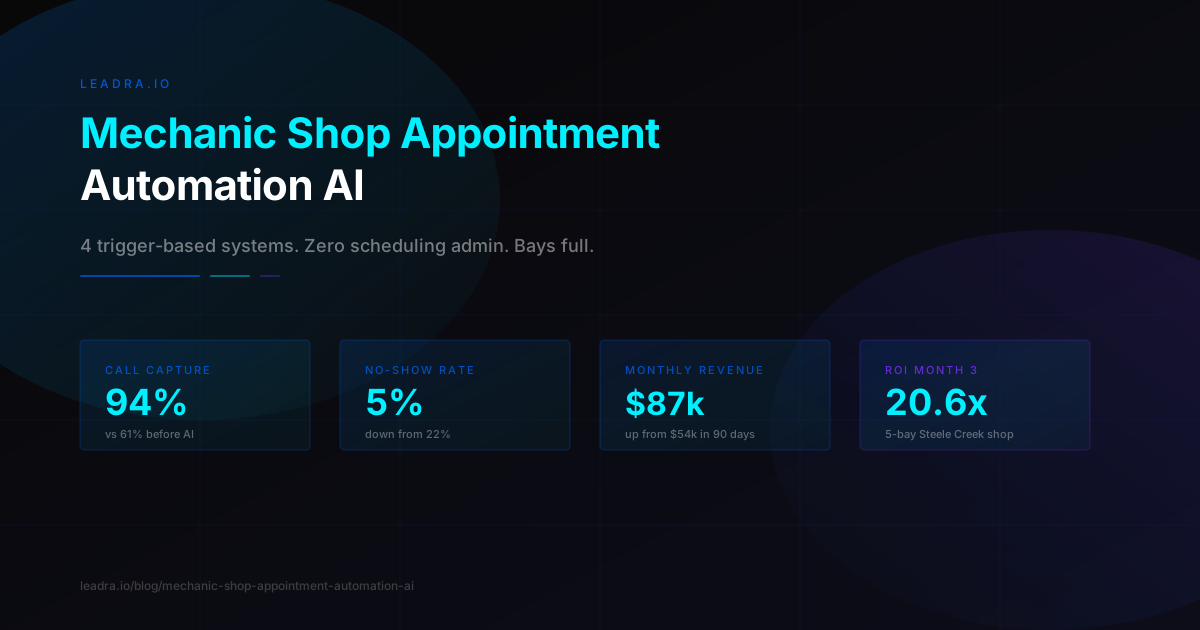
- →Inbound call capture rate: 61% to 94%
- →No-show rate: 22% to 5%
- →Cold estimate close rate: 9% to 31%
- →Dormant customers reactivated: 38 in first 90 days
- →After-hours appointments booked per month: 0 to 19
- →Google reviews: 11 to 57 (46 new in 90 days)
- →Monthly revenue: $54,000 to $87,000
- →Monthly system cost: $1,600
- →ROI in month 3: 20.6x
The owner's observation at the 60-day mark: “The phone used to ring during a walk-around and I'd have to choose between the customer in front of me and whoever was calling. Now I finish the walk-around and the appointment is already booked by the time I look at my tablet. That alone changed how the shop runs.”
What to Expect at 30, 60, and 90 Days
AI appointment automation does not take 6 months to show results. Here is a realistic timeline for an independent mechanic shop with 4-8 bays:
Month 1 (Days 1-30): Immediate Gains from Call Capture and No-Shows
The AI voice agent goes live within the first 2 weeks. You will see the call capture rate shift within the first 3 days of operation — calls that previously rang out to voicemail now book appointments. The no-show reminder sequences fire for every booked appointment, and you will see the first measurable drop in no-show rate within the first 2 weeks. Most shops add $6,000-$12,000 in revenue in month one from these two improvements alone.
Month 2 (Days 31-60): Estimate Recovery Starts Producing
The estimate follow-up sequences have been running for 4+ weeks and the pipeline is filling. Customers who received quotes 3-6 weeks ago start booking. The dormant reactivation campaign surfaces customers who “meant to come back” and converts them through a single text. Review volume picks up as the post-visit request goes out after every completed job. Google Business Profile starts showing more calls as the review count climbs.
Month 3 (Days 61-90): Full System Operating at Steady State
All four trigger systems are running simultaneously. The AI has handled 200-400 calls and is optimized for your shop's specific service types and most common call patterns. No-show rate is at its new baseline. Estimate close rate has stabilized at 2-3x its original level. The dormant reactivation pool is being worked systematically. This is typically when the full revenue impact becomes visible — a $20,000-$35,000 lift over the baseline in month three is common for shops in this tier.
3 Things You Need Before Setting Up AI Appointment Automation
Most mechanic shops can go live in under two weeks. Three things that affect timeline and results:
1. Access to Your Shop Management Software
The AI connects to Mitchell 1, Tekmetric, Shop-Ware, RepairShopr, Bolt On, or Jobber via API. You need admin access credentials so the integration team can read bay availability and write appointment data. If you are on a legacy system without an API, a workaround calendar bridge is available but adds setup time. Confirm your platform before kickoff so the integration team can configure the right connector.
2. A Customer Database or Call Log
The dormant reactivation sequences work best with a clean list of past customers — name, cell number, vehicle, and last service date. Your shop management software already has this if you have been using it consistently. If you have been taking cash-only jobs without logging contact info, the AI can still run call capture and no-show prevention — you just start building the reactivation database from new customers forward.
3. A Business Phone Number That Can Forward
The AI voice agent intercepts calls when no one picks up. This works by either forwarding your existing business number to the AI system on no-answer, or by porting the number. Most shops prefer the forward-on-no-answer setup because it is invisible to customers — they call the same number they always have. The AI only intercepts when your team does not pick up, not for every call.
At Leadra.io, we handle the setup from kickoff to live calls — AI voice agent configuration, shop management software integration, reminder sequences, estimate follow-up triggers, and ongoing monitoring. Most mechanic shops are booking AI-assisted appointments within 10 days of starting the onboarding process.
Frequently Asked Questions
How does AI appointment automation work for a mechanic shop?
AI appointment automation for a mechanic shop runs four trigger-based systems: a 24/7 voice agent that answers and books every missed call, an automated confirmation and reminder sequence that fires the moment an appointment is booked, a follow-up sequence for customers who received estimates but never scheduled, and a dormant customer outreach campaign for past clients overdue for service. Each system pulls available bay slots from your shop management software and writes confirmed appointments back into it — no separate calendar, no manual entry.
What is the ROI of AI appointment automation for mechanic shops?
Most 4-8 bay mechanic shops see $15,000-$35,000 in additional monthly revenue within 90 days. The three biggest drivers are recovered missed calls during peak hours, no-show reduction from 18-26% to 4-7%, and cold estimate recovery at 22-38% close rates. At $450-$520 average repair tickets, recovering 3-4 no-shows per week alone covers the cost of most systems. ROI of 12x-25x in month three is typical.
Does AI appointment automation require replacing my shop management software?
No. AI appointment automation layers on top of your existing system — Mitchell 1, Tekmetric, Shop-Ware, RepairShopr, Bolt On, or Jobber. The AI reads your open bay slots in real time and writes booked appointments directly into the same system your advisors already use. No duplicate data entry, no parallel calendar to manage. Your team sees AI-booked jobs exactly the same way as manually-booked jobs.
How long does it take to set up AI appointment automation for a mechanic shop?
Most mechanic shops go live in 5-10 business days from signed agreement. The process: 2-3 days for AI voice agent configuration with mechanic-specific service intake scripts, 2-3 days for shop management software integration and bay sync, and 1-3 days for reminder sequence build and live call testing. Full optimization — where the AI learns your most common service types and peak booking patterns — takes 30-45 days.
Ready to Put Your Scheduling on Autopilot?
Leadra.io builds and manages complete AI appointment automation systems for independent mechanic shops. We handle setup, shop management software integration, trigger sequence configuration, and ongoing optimization — so your team focuses on the vehicles, not the calendar.
Most shops see the first AI-booked appointment within 48 hours of go-live. No-show rates begin dropping in the first two weeks. Estimate recovery typically produces the first converted job within 7 days of the sequences going live.